How I used Claude Design to build prototypes for two very different audiences

How I used Claude Design to build prototypes for two very different audiences

Half the time and efforts, twice the impact

Half the time and efforts, twice the impact

Context

Mindtickle exploring a potential integration with Trupeer AI

Tool

Claude Design

Time saved

3 days and significant rework!

Context

Two different audiences and purposes with a tight timeline

Two different audiences and purposes with a tight timeline

At Mindtickle, we were exploring an integration with Trupeer AI - a tool that transforms video creation using AI. The idea was to bring Trupeer's capabilities directly into Mindtickle's content center, so users could create and transform videos without ever leaving the platform. Screen recordings, audio-only recordings, webcam - all accessible from within the content creation flow they already knew.

Before any of this could become a real feature, we needed two things:

  • Trupeer on board

  • Our key customer: Harley Davidson University (HDU) to see the vision clearly enough to get excited about it

That meant two prototypes for two audiences with two completely different purposes. And a tight timeline.

I turned to Claude Design.

How I worked with it

It was much more like directing a junior designer

It was much more like directing a junior designer

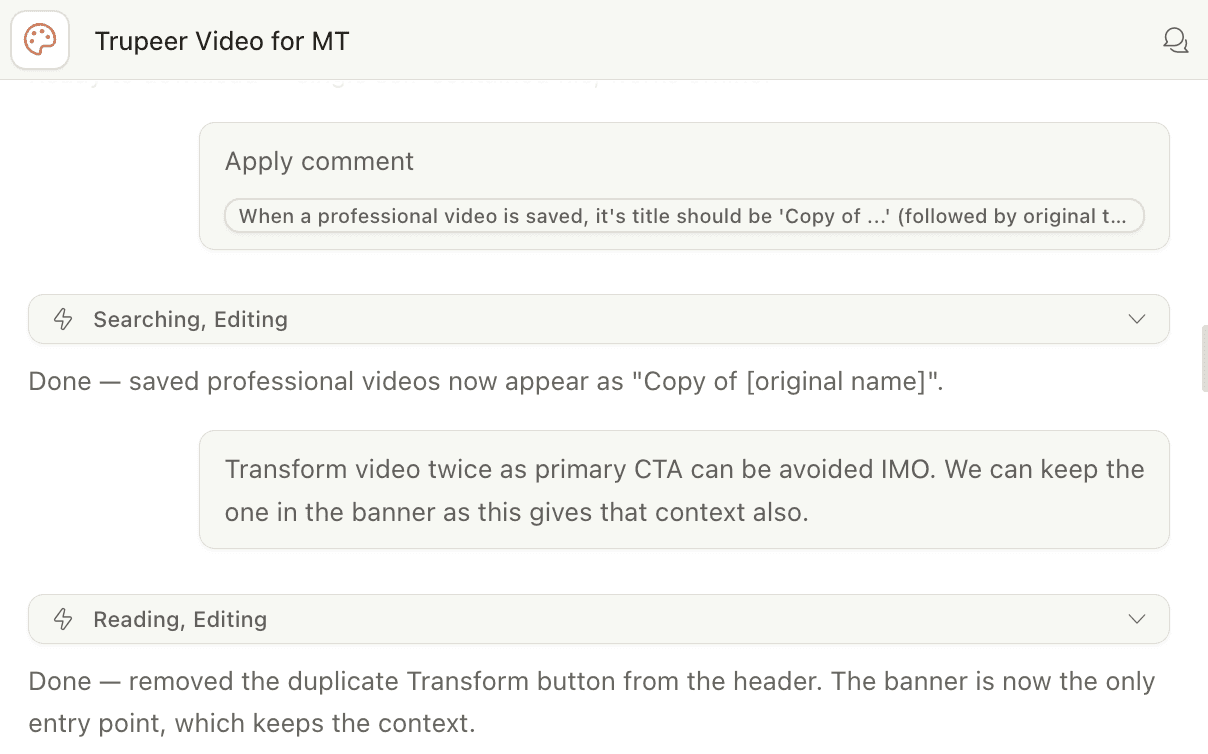
The process didn't involve any one magic prompt that would give the final output. It involved multiple short, specific instructions and fast back-and forth. A lot of 'Yes, now do this' and 'Actually, change that'.

I started by giving it a strong visual foundation by uploading screenshots of both Mindtickle's content center and Trupeer's existing product, followed by explaining the flow in plain language. This saved me a lot of typing for describing the UI layout.

The process didn't involve any one magic prompt that would give the final output. It involved multiple short, specific instructions and fast back-and forth. A lot of 'Yes, now do this' and 'Actually, change that'.

I started by giving it a strong visual foundation by uploading screenshots of both Mindtickle's content center and Trupeer's existing product, followed by explaining the flow in plain language. This saved me a lot of typing for describing the UI layout.

This is something I would recommend to anyone using Claude Design: the more visual context you give it upfront, the less correction you do later.

When I needed the editing panel to match Trupeer's actual UI, I uploaded their screens directly and said: "Let's reference this for the editing tools layout." It rebuilt the panel to match. This kind of reference-driven prompting is what kept the prototype feeling contextual and not than generic or something that lacks personality (and screams like it was made by AI).

💡

This is something I would recommend to anyone using Claude Design:
the more visual context you give it upfront, the less correction you do later.

Prototype 1

Selling the vision to Trupeer AI

Selling the vision to Trupeer AI

The first prototype was about communicating vision and requirements. Trupeer needed to see the clear vision for how their technology would live inside our product and what it will help achieve enablement admins. This prototype also needed to convey that this is well-thought, structured integration.

The process didn't involve any one magic prompt that would give the final output. It involved multiple short, specific instructions and fast back-and forth. A lot of 'Yes, now do this' and 'Actually, change that'.

I started by giving it a strong visual foundation by uploading screenshots of both Mindtickle's content center and Trupeer's existing product, followed by explaining the flow in plain language. This saved me a lot of typing for describing the UI layout.

This is something I would recommend to anyone using Claude Design: the more visual context you give it upfront, the less correction you do later.

The discussion and iteration loop was very fast.

  • Thumbnail too small? Increase it 200%.

  • Templates need to be split into on-brand vs. other? Let's add quick filters.

  • Add a contextual banner? Done.

And each of those decisions took seconds to execute. In Figma, each one is a manual task: resize, reposition, re-check spacing and repeat across screens. Here, I was spending my time deciding, not executing.


The call with Trupeer went well. They were in🥳

The process didn't involve any one magic prompt that would give the final output. It involved multiple short, specific instructions and fast back-and forth. A lot of 'Yes, now do this' and 'Actually, change that'.

I started by giving it a strong visual foundation by uploading screenshots of both Mindtickle's content center and Trupeer's existing product, followed by explaining the flow in plain language. This saved me a lot of typing for describing the UI layout.

This is something I would recommend to anyone using Claude Design: the more visual context you give it upfront, the less correction you do later.

Prototype 2

Making things real for a key customer

Making things real for a key customer

With Trupeer aligned, the next job was different. We needed to show Harley Davidson University, an actual Mindtickle customer - how this integration would enhance into their workflow specifically.


And I started thinking: if executing ideas has become so much faster, why not use it's full potential?

The process didn't involve any one magic prompt that would give the final output. It involved multiple short, specific instructions and fast back-and forth. A lot of 'Yes, now do this' and 'Actually, change that'.

I started by giving it a strong visual foundation by uploading screenshots of both Mindtickle's content center and Trupeer's existing product, followed by explaining the flow in plain language. This saved me a lot of typing for describing the UI layout.

This is something I would recommend to anyone using Claude Design: the more visual context you give it upfront, the less correction you do later.

I uploaded a screenshot of their actual Mindtickle environment, attached their logo and gave a single instruction: make it feel like their site. Claude Design pulled their file names, folder names, user names and terminology directly from the reference screenshots and rebuilt the UI content around it.

The result: when HDU's team looked at the screens, they weren't doing mental gymnastics to imagine themselves in the product. They could just see their site: their files, heir folders and their team.


Building impactful experience faster without the actual cost of the impact - is the real advantage here.

The process didn't involve any one magic prompt that would give the final output. It involved multiple short, specific instructions and fast back-and forth. A lot of 'Yes, now do this' and 'Actually, change that'.

I started by giving it a strong visual foundation by uploading screenshots of both Mindtickle's content center and Trupeer's existing product, followed by explaining the flow in plain language. This saved me a lot of typing for describing the UI layout.

This is something I would recommend to anyone using Claude Design: the more visual context you give it upfront, the less correction you do later.

Summary

'Human' thinking that made the difference

'Let's try to personalize it for the audience' was an idea that came from a human. It was a design decision. AI didn't decide to do it, I did. AI helped me execute it.


At another point, I caught something. I had updated a video title and thumbnail in one place and Claude Design didn't automatically carry that change through to every other screen where the same video appeared.


A human designer knows that consistency isn't optional. If a video is titled one thing in the library, it has to be titled the same thing in the preview, in the edit flow, in the confirmation state. So I called it out explicitly. I directed Claude Design to treat the video as a consistent object across all screens, not as independent UI elements. It got corrected. But the point is: I had to know to ask. This is the part people miss when they talk about AI replacing designers.

The process didn't involve any one magic prompt that would give the final output. It involved multiple short, specific instructions and fast back-and forth. A lot of 'Yes, now do this' and 'Actually, change that'.

I started by giving it a strong visual foundation by uploading screenshots of both Mindtickle's content center and Trupeer's existing product, followed by explaining the flow in plain language. This saved me a lot of typing for describing the UI layout.

This is something I would recommend to anyone using Claude Design: the more visual context you give it upfront, the less correction you do later.

What I took away

Two prototypes. Two days. Both polished enough for real stakeholder conversations: one with a potential integration partner, one with an active enterprise customer.


In Figma, the same work would have taken 3–4 days minimum and that's before accounting for the inevitable rework when feedback comes in and layouts need restructuring.


But the shift wasn't only speed. It was also where my energy went. I wasn't pushing pixels. I was making decisions about flow, hierarchy, what each audience needed to feel, what the AI got wrong and why.

The process didn't involve any one magic prompt that would give the final output. It involved multiple short, specific instructions and fast back-and forth. A lot of 'Yes, now do this' and 'Actually, change that'.

I started by giving it a strong visual foundation by uploading screenshots of both Mindtickle's content center and Trupeer's existing product, followed by explaining the flow in plain language. This saved me a lot of typing for describing the UI layout.

This is something I would recommend to anyone using Claude Design: the more visual context you give it upfront, the less correction you do later.

💡

I think that's a different way of working: AI handling the execution and designers making decisions.

© 2026 Manali Bapat

© 2026 Manali Bapat

© 2026 Manali Bapat

Create a free website with Framer, the website builder loved by startups, designers and agencies.